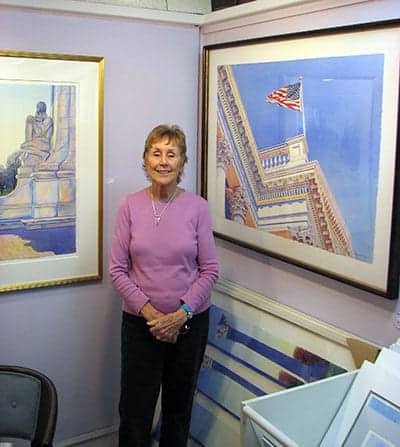
Torpedo Factory artist Margaret Huddy has been painting for decades, but this month she was selected by jurors as the recipient of the Carol Zakaski Memorial Award for best watercolor out of all the pieces juried into December’s All-Media exhibit at The Art League Gallery.
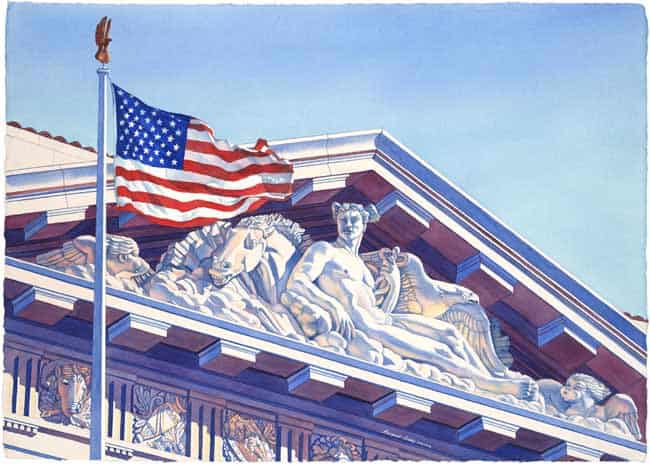
The winning piece was Trade Winds, one of many watercolors she’s painted of Washington monuments. The painting depicts the sculpture at the top of the Interstate Commerce Commission, from which the piece takes its name. We sat down with Margaret in her Torpedo Factory studio to chat about the watercolor and her art career.
Margaret is well-known for her paintings of monuments and her sycamore tree. “I love to paint white things … because I can have so much fun with the color,” she says, noting that height restrictions in DC allow plenty of light to reach the buildings. Trade Winds features pinks and purples highlighting the effects of light on the white facade.
For her larger works, including Trade Winds, Margaret works from her own photographs, “stomping around” to find her locations — generally when it’s cold and windy outside. Sun is important here, as well as the strong wind reproduced in Trade Winds. Margaret says she finds the camera helps to narrow the focus of her paintings. “I compose them with a camera,” she says. But for smaller works, she paints en plein air, giving the paintings “the life.”
Landscape has always been her passion, Margaret says, explaining that still lifes and other subjects haven’t caught her attention in the same way. And as part of a military family, she got practice in a variety of environments. “I know how to paint a palm tree; I know how to paint snow,” she says.
The military lifestyle was also responsible for her choice of medium, which she says fit the smaller quarters as her family grew. Until recently, Margaret had been working exclusively in watercolor since 1957, but recently has branched out into using gouache — and also acrylic, after taking a workshop with Peter Ulrich at The Art League School.
Margaret is facing a dilemma for the future, as her sycamore tree, which has been the subject of a series of paintings and its own book, is dying. “I’ve tried to fall in love with another tree, but I haven’t been successful,” she says. With the future of that series up in the air, she plans to continue working on smaller pieces and “enjoy painting landscapes wherever I am,” she says.